
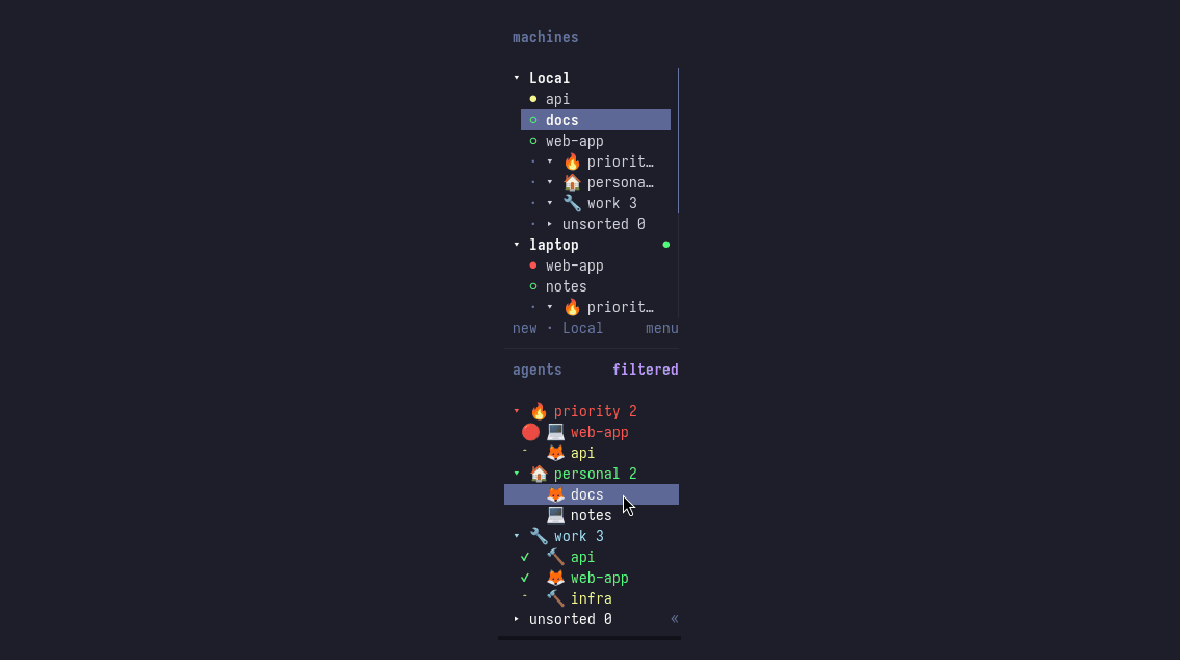
Once your coding agents run on more than one machine, the sidebar needs to say where each one is. A full hostname on every row takes room the agent's name needs. One character does it.
herdr-machine-icons is the third herdr plugin Ben Hart has released this week. herdr is a terminal multiplexer for running coding agents, and it already reaches other machines. This plugin tags every pane with its machine's icon, as a pane token called machine_icon, so the sidebar can show a fox, a laptop or a hammer emoji where it would have shown devbox, laptop or buildbox.
Setup is one list
Install the plugin on every machine herdr reaches, and give each the same list, one hostname and icon per line:
devbox   🦊
laptop   💻
buildbox 🔨
Then put the token in the sidebar row in herdr's config.toml:
[ui.sidebar.agents]
rows = [["state_icon", "$machine_icon", "workspace", "tab"]]
A machine with no line gets no icon, so its agents show none.
No machine reaches another
Each machine tags only its own panes, at server start and whenever a pane or an agent appears. So nothing has to connect across machines, and a restart puts the icons back on its own.
It pairs with herdr-queues, whose list of waiting agents can carry the icon next to each one.
What it needs
Python 3's standard library and nothing else. It is tested on Arch Linux, macOS 14 and Windows 11, and CI runs the tests on all three. It is MIT licensed.
herdr plugin install Benjmhart/herdr-machine-icons
The code is at github.com/Benjmhart/herdr-machine-icons.
